I was surprised to find a tweet from Gareth Illman-Walker in my notifications this morning; I’ve known him for a good few years, but he doesn’t tweet much these days. Glad I saw it though, as it drew my attention to this almost Scarfolk-like leaflet:
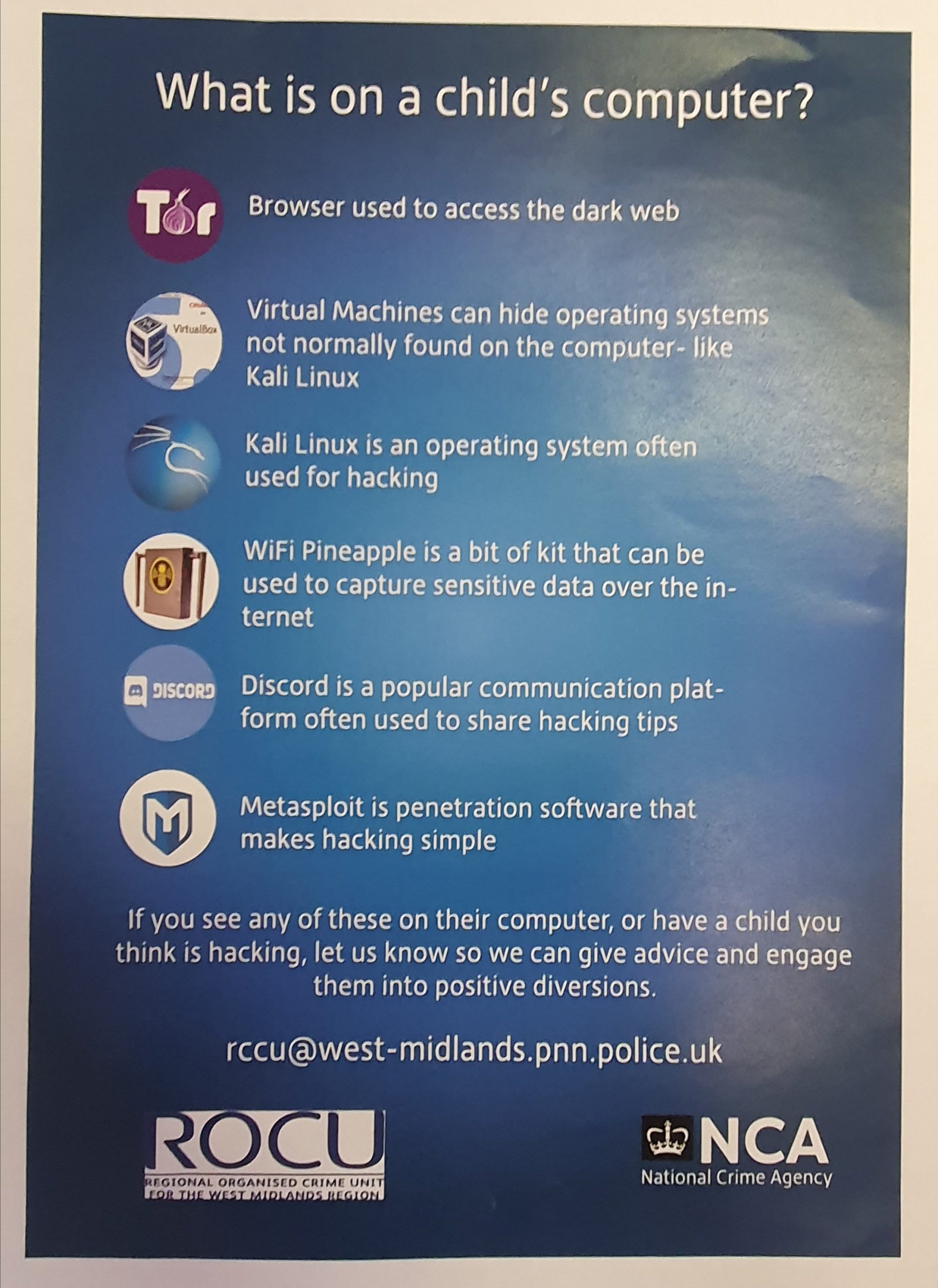
Continue reading Gettin T33nAge H4cks, all through the night
Category Archives: Computers
New Device
I’ve spent the last few years using what was my dear better half’s ex-laptop, a truly ancient Lenovo B-500 that I’d bought back in the mists of time and had become unusable in Windows. Ubuntu gave it a bit more life, but eventually, it just got too old.
I’m mean when it comes to PCs, so I turned to the ex-corporate refurb world, and picked up a refurb Thinkpad T-430, with Windows 10, an SSD, core i5, and 16GB of RAM for a good margin below £300. A bit of fiddling with BIOS (re-enabling UEFI boot, mostly) and it’s running Ubuntu 19.10 with no driver headaches. I’m keeping Windows for the odd application (VCDS, for one), but Ubuntu will remain my OS of choice.
The machine itself looks like new, and performs well too, and as it’s business-grade, should take the knocks.
There Is No Cloud
..there is just someone else’s computer.
I’ve touched on this before, here. Devices and software we buy can give us great things: we can stream films or music rather than shipping physical media (move bits, not atoms), and deliver amazing connectivity, but when these services depend on someone else’s computer (and if you can’t touch it, it isn’t yours), you can’t rely on them being there.
A very small illustration. I have a bus time app. It is was great. I’d look at a bus stop on the map it grabbed from Google Maps, and it shows me destinations, routes, and more. The data is publicly available, and indeed, Google Maps itself uses the data built into maps- essentially, all the app does is glue together some bits of data, and present it nicely.
Suddenly it stopped working, with a typical error message for phone apps, saying it couldn’t connect and to check my data connection- which was fine. I assumed a temporary problem.
A month or so later, it’ still not working. I email support, and remove the app, re-install it. Clear the data and cache, then eventually wipe the phone. Still no good, so I install on a different phone. Still no good, and still no answer from support.
At this point I can only assume the company is no longer maintaining it, and whatever server it calls home to on the Internet is no longer operational.
For 3-4 quid of app, this is not a problem, but it might piss you off a little if you’ve bought some IoT hardware (Hive, or Ring, for example) and they decide to pull the plug. If you’ve just migrated a huge datacentre into cloud, it could be a disaster.
Remember: if you can’t touch it, you don’t own it, and even if you can touch it and do own it, unless you control every service it needs, it can be taken away from you.
Anyway, not all bad, I ended up with a better app 🙂
[Edit 14/03/2018]
I’ve now had a reply from the app’s author:
Fixed about half an hour ago.
Sorry for the outage and not replying sooner. I have moved suppliers and the problem should not recur.
Which is kind of a shame, as I’ve given up and moved to something else now.
LMGTFY
A minor intertubes annoyance of mine.
I use Google Maps quite a bit. Not massively for sat-nav, as I’m a terrible luddite for navigation, and don’t have a suitable car holder, but for finding pubs, bars, restaurants, stations, shops etc if walking. I’ll use the reviews as a guide, and I contribute back to it as well: I’ll edit places I know are wrong, I’ve added photos of opening times that Google can scan and publish automagically.
Overall, it’s pretty cool. Yes, you’re dealing with a big evil tech firm, and they’re getting a lot of data for free, but it’s useful for me, and the contributions may be useful (they’d be even better if it would let me add The Jigger’s Whistle, but meh).
One thing, though, is troubling me. Nagging away at me like an untraceable rattle in the dashboard.
Questions. Questions asked by people too damn lazy and/or stupid to do even the most basic research on the computer they are in front of or holding in their hand. The maps app on my phone will occasionally prompt me about a place it knows I have been and say
Someone has a question about [place], can you help?
and like a twat, I’ll view the question, because it’s good to help.
Here’s a typical example, with a fairly succinct answer from another contributor.

Really? Not even a full sentence, and the answer should be pretty fucking easy with the fucking Internet in front of you, shouldn’t it?
Looks pretty easy to me. Fuckwits.
Ubuntu 17.10 and an abcde ripping failure
Recorded here as I couldn’t find any mention online: abcde is a fantastic command-line CD ripper for Linux that does something very clever- it glues together lots of individual tools to automate ripping, encoding, and tagging music files. Handily it can rip to FLAC and MP3 (for the car stereo) in one hit, like this:
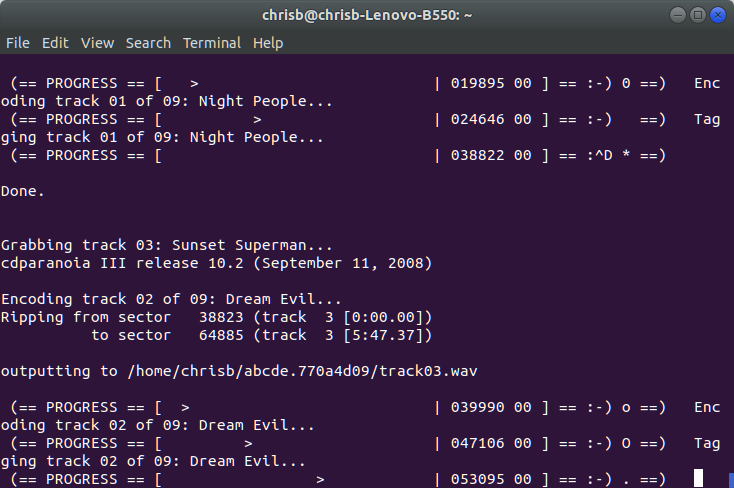
I recently had a bit of a mishap involving a laptop, so had to fresh-install Ubuntu, and copied over the config file for abcde. It sort-of worked, but at the point where it has ripped tracks, and is meant to tag them and move them from the working folder to $HOME/Music/mp3 and $HOME/Music/flac it bombed with
tagtrack-mp3-03: returned code 1: nice -n 10 eyeD3 [arguments sent to eyeD3]
Running eyeD3 with the same arguments manually gave
Traceback (most recent call last):

  File "/usr/bin/eyeD3", line 6, in

    from pkg_resources import load_entry_point

ImportError: No module named pkg_resources
The simple answer is
sudo apt-get install python-pkg-resources
and away it goes. I’m not sure if that package is suggested for eyeD3 or abcde, but it’s clearly not set as a dependency, or apt would install it- apt is usually extremely good at this kind of stuff.
Password Authentication Protocol
I’m not known for my love of politicians: I generally hold the opinion that anyone looking to become a politician should automatically be prevented from doing so. Politiciana, I feel, are generally out for themselves, are often involved in debates that they’re ill-qualified to speak in. I know there’s exceptions, I know some politicians are direct and work hard to represent their constituents.
But I also know that there’s also terribly ignorant people in the House of Commons.
Great example, this week. Damien Green is under investigation because a large quantity of e-smut was found on his PC.
Now, let’s be clear: I don’t care about the actual porn. Nothing was illegal, so if he feels the need to knock one out at at work, I don’t see the problem provided he’s alone and has sufficient tissue to hand, if you’ll forgive the expression- if indeed it was him viewing the pr0n.
And there are the problems. First of all, porn sites are famed for introducing malware, so somewhat ironically, if you go looking for Internet sex, you stand a higher chance of encountering a dose of the e-pox.
Secondly, there’s a question that it was him. Nadine Dorries was quick to leap to his defence:

and was then followed by a truckload of MPs saying similar things. Jumping over one another, in fact, to say just how shit they are.
So, essentially, it’s common practice for MPs to share their passwords with all and sundry. MPs that represent us, store our personal data, and make the laws of this country, showing an apalling lack of good practice. For a really good, in-depth analysis of just what is wrong here, take a look at Tim Turner’s Information Law Blog.
In the meantime, just take a while to think about these people who are too important to take your data seriously.
Runeaudio
I’ve had a Volumio music player for a while: pretty good overall, but sometimes a bit prone to corrupt filesystems. Checking the website, there was a new version, so I thought I’d try it. It was….interesting. Cleverly done, with squashfs filesystem images and a data partition to save data, but using it gave me a few issues. First of all, the original Raspberry Pi model B I was using turned out to be too slow: the initial setup took 20 min to complete, and playing audio was glitchy as it couldn’t shift data down the USB fast enough. Changing to a Raspberry Pi2 fixed that, but then it dropped off the network. With no HDMI monitor nearby, this was impossible to troubleshoot, so I tried an alternative: I had a HP thin client lying about, and Volumio has a x86 experimental version, so with a CF-IDE converter and a CF card to replace the tiny flash disk in the HP, off I went. Working out a few bugs in the BIOS that make booting the CF and not trying to boot the external USB drives that just contain music took a while, but it worked, quite well, with 2 problems- firstly, the web interface and the view through Cantata didn’t agree, and secondly…
Continue reading Runeaudio
Free the Meraki
So, around 3 years ago, we had some Meraki access points at work. I was pretty keen on the tech, but less so on the licence model, where you pay the going rate for an access point, and then have to pay for a licence to use it, or it becomes useless, because it will only work if connected to Meraki’s cloud managment.
This is no longer true, and became untrue a while ago, and as the Meraki APs we had have come due for renewal, and have been replaced, I had one thrown in my direction.
A bit of searching threw up a few pages suggesting OpenWRT will work just fine, with a couple of caveats about the difficulty of rooting the device to gain enough access to overwrite the Meraki firmware: they’d really rather not let you do this- they give away sample access points, so maintaining their licence model is the way they make money.
Anyway, I already had a CP2102 USB-Serial (TTL level) converter I’d bought to have a play with one of those dodgy webcams, so I bought a PSU from Ebay, and got out the soldering iron, PuTTY, and an ethernet crossover cable.
The basic instructions are here, but to get root, I had to follow the procedure here, and indeed root the standard firmware (to get a reboot command, as my AP would not boot properly with the UART connected to the laptop).
The first challenge was getting the UART cabled correctly: the phrase
an UART adapter wired to the MR18 (speed is 115200). Pinout (left to right): VCC/RX/TX/GND
was misleading for me: first of all, that is corrrect if you hold the AP with the connector at the top like in this picture, and secondly, the RX/TX desgnation refers to which pins you need to connect from the CP2102, rather than their function on the AP, so I had some fun getting the UART cabled.

The second, but not hard, challenge was installing a web server, and realising that openwrt-ar71xx-nand-mr18-initramfs.bin had changed name to openwrt-ar71xx-nand-mr18-initramfs-kernel.bin in a later version.
The third challange was that the AP got stuck in a boot loop from cold with the UART connected, though a warm boot was fine. That wasn’t a problem for the initial rooting (where you hold down “S”), as there’s enough time during the boot cycle after powering up the AP, but when it came to booting the OpenWRT image, I couldn’t hit “2” in time: I resolved this by rooting the Meraki firmware to get a reboot command, then hitting “2”.
With those out the way, it was as simple as setting an appropriate fixed IP on the laptop, connecting the ethernet crossover, logging in to the newly booted image’s LUCI interface, and applying the full firmware image, which erases the Meraki firmware once and for all, and you have a free MR18 🙂
Open the Box
Andy presented me with an interesting challenge:
Your mission, should you decide to accept it, is to get Linux on this accursed box.
The accursed box was a Sumvision Cyclone Mini PC: an Intel Atom SoC based PC, in a nice little box about the size of a domestic router. It has been quite popular for a Windows Media playerbox, with wireless built in, and a HDMI-out, but this one was hopefully destined for more geeky things: an easily deployable network monitor, so first thing is Linux.
Apparently others had given up in frustration, and powering it up gave me a particularly unfriendly UEFI shell that didn’t have a scroll-lock, so you couldn’t see the available commands. Nice. I found a way into the BIOS-style setup, and checked all the obvious things; secure boot disabled, clear the secure boot keys, etc. What was notably odd was a OS/BOM seletion screen (that is their typo, not mine) that was set to Windows 8, and all greyed out, and no CSM (or Legacy) boot modes.
Continue reading Open the Box
Make Tech Difficult
One of the things non-techies hate about tech is the complexity of setting some things up, and the rise of IoT, and the ubiquity of smartphones and home broadband has meant that our homes have more and more tech, and that tech is expected to talk to the cloud, and perhaps talk back.
Manually configuring this gear can be a bit tricky, so there’s a bunch of things making it easier. Your ISP may well provide a router, with default passwords. IP cameras will “phone home” to the manufacturer’s site to register themselves, so you don’t have to manually set up dynamic DNS. That router from your ISP will probably use UPnP so it can open ports for the camera and any other devices. Things like Nest or Hive bypass that by depending on a server in the cloud on someone else’s computer to make the connection.
All nice so far. Even better, these things are putting my favourite OS, Linux out there. As Linux is free, and powerful, and efficient on the low-power chips in these devices, it gets used a lot.
You’d think I’d be pleased.
But there’s a problem. Lots of these devices have poorly implemented security. Others depend on a hosted service, so if someone decides to stop supporting it, or indeed changes the API you have an expensive paperweight.
The Mirai attacks first turned IP cameras into a huge botnet, and now malware has got its hands on routers: the very device you expect to secure your home network, and let’s not forget that if your IP camera (inside your firewall/router) is compromised, it could be used as a tool to attack your PC, and the router will happily help out by opening ports for it: many cameras have poor web interfaces and hardcoded “root” passwords (I have one myself with a password of “123456”)
I realise I’m sounding a little like a luddite here; or perhaps the techie complaining about tech doing stuff itself and therefore meaning people need fewer techies, but here’s the rub: the more of this stuff that gets out there, the bigger the attack surface, the bigger the gain, and the bigger the effect on everyone. So, a little advice:
1. Think if you really need that IoT device.
2. Change default passwords.
3. Consider tossing your ISP-supplied router. It’s probably shit anyway. Turn off UPnP, even if that means you have to get help opening and forwarding ports. There’s a fucking good reason a firewall closes ports, so why bypass that?
4. Consider not buying the very cheapest IP cam like mine 🙂
5. If you invest in cloud-connected devices, entertain the fact that you just lost control of them.
6. If there’s updated firmware, use it.
7. Linux does not mean secure. The kernel itself probably is, but a lot of embedded devices are poorly secured.